Monday, June 30, 2014

Old Glory's Reflection

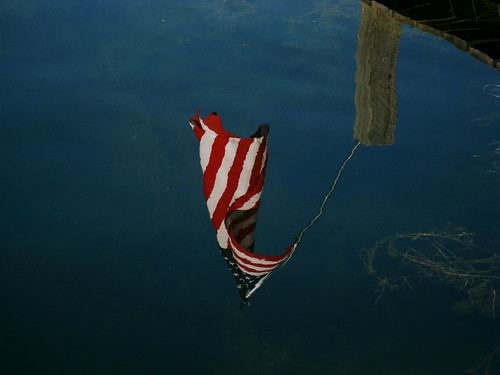
One of my favorite places for vacation is my mom's families lake property in Spokane. For the 4th of July one of my aunts put up an American Flag at the end of the dock and it has stayed since. On a warm August morning while on vacation I took this picture of Old Glory's reflection on the glassy water.  This was my favorite of the few I took, with barely any distortion of the reflection and some of the underwater weeds visible in the shot.

Old Glory's Reflection
A Summer Day's Reflection


I tried looking at this image rotated so it would appear that the flag is in a normal orientation, but the effect was almost disorientating and didn't look right to the eyes. Anyway, this was one from the archives and a fitting image with the 4th of July right around the corner!

Have a safe and happy 4th of July everyone.

Blessings,

Jesse

Thursday, May 29, 2014

The Shutterfly Experience

In today's age of digital photos virtually any digital device manufactured has a camera (or two) built in. Even with the proliferation of digital cameras riding on millions of devices, the reality is that a vast majority of photos are never destined to actually be printed. Of course, many of these photos would likely not even be taken in the first place prior to the rise of the mobile camera, but thats a whole different topic and/or debate.

For those photos that are destined for an existence outside of digital bits, there are plenty of establishments (local and on-line) that compete for your photo printing dollar. Shutterfly being a large and well known one. So how is the Shutterfly experience? Worth the time or not?

User experience is typical of on-line sites that offer uploading for prints: logically organized to get where you want to be. When you log in, your dashboard/control panel/home page (or whatever else you prefer to label it) will show you a brief over-view of all your saved work (photo albums, projects etc...) and a place to view your account and order settings. In addition to photo albums and projects such as baby books and greeting cards, Shutterfly offers a Share Site option where you can configure a personal site (within their templates of course) where you can share your photo albums and projects so family members (or say, family members of a little league team if one was created for the team) can view and order photos you have uploaded and projects you have created within Shutterfly. I think this is a pretty nice option, though admittedly I have not done more than simply create one.

To date we have claimed our 50 free print promotion given when you first create an account, created a free baby book (received from registering at target for baby gifts I believe) and created a birth announcement card with pictures of our first born son. The quality is what you would expect from a commercial printing outfit (great quality, no complaints!) and the shipping is reasonably priced and arrives in an acceptable time frame.

The best part of the whole Shutterfly experience is the vast amount of promotions and discounts (provided you don't mind regular Shutterfly e-mails in your in-box). They even start you off with 50 free prints when you first register and fairly frequently I have seen other free print promotional e-mails, in addition to 40% (or better) promotional e-mails. Predictably, many promotions show up in time for yearly events such as Mother's & Father's day.

When it comes to full priced items and typical prints, the shipping costs are going to put your total out of pocket costs higher than a local photo lab (such as Costco). But when you get a batch of free prints or a discount such as a free 8x8 photo book, your total costs come in at a more competitive price with the local lab and may actually total in a little less expensive (and you don't have to go pick them up).

Shutterfly is definitely worth a look when your looking for photo prints or other projects. Sure there may be some downsides to an on-line, non local outfit, but overall it is not a bad option.

Blessings,


Jesse
Monday, April 21, 2014

Converting an Image to Black and White with Darktable

When converting an image to black and white, there are different ways to go about it with different programs. From a basic desaturate command to a more involved process where you are manipulating multiple channels to adjust the final look. In this post we will be exploring two different ways to convert an image to black and white with Darktable.

First step after importing our image into Darktable is to make our adjustments as if we were developing the image in color (noise reduction, white balance etc...) Below is a screen shot of my initial development and and the adjustments used (sharpen and base curve are automatically applied upon import).

Imported and Developed as if for a color image final

Next, we will use the monochrome module in Darktable to do our first conversion. For this module, simply drag the circle around the color pallet until you have the desired look. You can also make the target circle smaller or larger (using the mouse wheel or two finger scrolling on a laptop track pad) which will change the final look of the image. Below is my screen shot of my monochrome conversion with this module (I had shrunk the circle slightly and moved it away from center).

Monochrome module settings

Now for the channel mixer module, which is my preference and that in my opinion,  is the option with the best results.  With the channel mixer selected, we will choose gray as the destination and then simply adjust the three (red, green & blue) channels till we have our desired results. In the screen shot below, you can see the values for my adjustments.

Channel Mixer module settings
Now that we have gone through the steps taken, below I have the resulting images for viewing and comparison. First the photo converted using the monochrome module followed by the channel mixer module.

Monocrome Conversion #1 with Darktable
Monochrome Module conversion

Monocrome Conversion #2 with Darktable
Channel Mixer Conversion

Your thoughts? Do you have a favorite way to convert to black and white or other methods that have great results not discussed here?


Blessings,

Jesse

Sunday, April 20, 2014

He is Risen!

Spring is the time of new life, and with today being Easter Sunday we get to celebrate the Eternal New Life God has given us through the Resurrection of Jesus Christ.

If you do not know Him, may His Grace find you this during this Easter Celebration. And if you do know Him, may his love and grace be ever more present in your life today and always.

Blessings,

Jesse

Monday, March 31, 2014

The Downtown Burlington Artwalk 2014

Spring is officially under way and April is upon us and in the Skagit Valley April means the annual Tulip Festival. The Festival includes many art exhibits in the mix of official events for the month. This year for the Downtown Burlington Art Walk, I will have two of my photos framed and displayed at the Spruced-Up Thrift Shop for the duration of this festival as a participant in this year's event.

I entered two, an 11x14 print of my Honeybee and Hibiscus Flower photo and a cropped 8x10 of one of the photos I took of a Northern Goshawk. The Hawk photo won an Honorable Mention award in the photography category for the juried contest portion of the Art Walk.

If you are around Downtown Burlington during the month of April, you'll have to stop by and see my photos. They'll be placed on Tuesday by the end of the day and ready for viewing.

Blessings,

Jesse

Thursday, March 13, 2014

Photos of Local Trumpeter Swans

Here in the Skagit Valley we are blessed to have large groups of Trumpeter Swans that winter in the fields every year. These beautiful birds are the largest of waterfowl and typically range between 54 and 65 inches in length. Living in the valley, I am blessed to see the wintering swans in local fields on any given drive away from home. Most of the time I don't have my camera, but one day fairly recently my lovely bride gave me a call to let me know the Swans were in a field close by and could make a good photo opportunity.  The two photos below are my favorites of the few I took on a quick photo trip.

Trumpeter Swan Stretching His Wings

A Group of Trumpeter Swans

I still want to get some more photos of the birds before they leave the valley for the season, especially a few photos of them coming in for a landing - or even taking off.

Blessings,

Jesse

Monday, March 10, 2014

ISO and Exposure

Of the three components of exposure (Shutter Speed, Aperture & ISO), ISO is the one that feels the most ambiguous. Shutter Speed is the easiest to understand: how long the shutter is actually open. And even though the math used to figure out the f number to describe the aperture is beyond most of us, the concept of smaller number equals a bigger opening and double the amount of light let in makes enough sense to grasp.

ISO on the other hand describes how sensitive the camera's sensor is to the light that it is exposed to. Uh, say what? With no other real explanation of how this works we are simply left with the information that each value doubles (higher value) or halves (lower value) the sensitivity.

So to get a good visual of how the ISO setting effects the final image, I set my camera on manual (after meeting on Program AE) and took a series of photos at the same Shutter Speed/Aperture combination and simply changed the ISO after each shot. I had originally metered the scene @ ISO 400 so there was room on either side to see the differences. Below is a composite with all six of the images (sized down to fit in one image) set in two rows to see how the exposure changes with just the ISO being different.

ISOComp_100-3200
1/5 second @ f/8

Looking back, I wish I would have taken one more on ISO 6400 to see the difference next to  ISO 3200. But with the ISO 3200 image already starting to overexpose I decided not too.

Blessings,

Jesse